Showing posts with label 100%. Show all posts

Saturday, October 12, 2013

Inpaint

Inpaint 5.5 is a photo removal software that I been using for a long time and it works great. The program matches pixels nearby to replace the pixels you select. If you have complicated thing you want to erase and  time and patience then it may take a while. For simple pictures one pass and your done.

Here I try to get rid of some legs and shadows crossing three different backgrounds:

Guy walking away ruined my shot.

Using just the marker and the Select tool and Mask tool.

After six different passes this is what I got and it took a minute.
If I wanted to be more precise I could use a smaller marker, the lasso, polygonal lasso, magic wand, or guide lines. Since I like doing things quickly I want rather just use the mark and repeated passes. Of course I can take some time and go at a pixel by pixel level and it would be seamless.

I have used this program to remove plenty of hands and entire people and it works great. The example above was very rough and I wanted to see if I can do it in less than a minute. From start up to six passes and saving the photo took one minute on my Windows Vista laptop.

This program can be easy or become complex but it still loads lighter than Gimp. I would recommend getting this for free at Give Away of the Day next time it is offered. Also over at Inpaint you can order the newest with free upgrades for $19.99, Mac and PC compatible.

Saturday, April 27, 2013

Image Resizer

The best, fastest, and easiest small image resizing tool is the Image Resizer Powertoy originally for Windows XP. It unfortunately is no longer supported by Microsoft but a huge fan base keeps it going for newer Windows versions.

It is simple after you download and install the program it adds a line to you right-click options when right-click a picture.


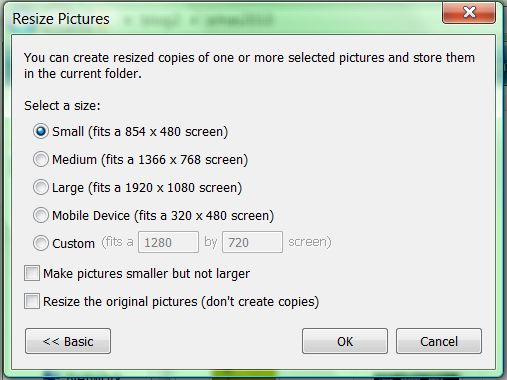
The second screen pops up and gives you a several options to resize the image. It will create a second file for example: original.jpg is resized to original (small).jpg.

While there maybe hundreds of photo editing software this is the best for older computers and Windows machine in general is Image Resizer.

Currently you can get the latest community supported versions at CodePlex.

100% is what I would give this little app and I hope they keep supporting it over at CodePlex.

Thursday, August 30, 2012

CrossMe Color

CrossMe Color

The follow up to the great puzzle game CrossMe is here and in full technicolor.

Menu Screen
Level screen
Game play, I wonder what it will be?

As with the original you are given a blank grid and using colored numbers you must fill it in until the correct picture appears. At first it seems easy but the possible outcomes become more difficult. If you make a mistake and do not notice then it can get frustrating. 

Each puzzle should take a minute or two but it is still tons of fun. Round of applause for the people at Dynamix the makers of this and PrinterShare Mobile Print which I also have installed. They keep it simple and user friendly which is not true for all current mobile applications.

Here's why this is a 100% program...
Pros:
  1. Great layout and ease of use.
  2. Very calming
  3. Works well, never crashed.
  4. Can become very difficult and works your brain.
  5. I got a $1.00 mp3 credit upon purchase but not sure it is still active. 
Cons:
  1. Needs more puzzle for free.
Rating: 10 out of 10 (100%)

Got it at:
Amazon: CrossMe Color $4.95

Monday, July 23, 2012

CrossMe

CrossMe

While it has been months since I played Angry Birds but I have been playing CrossMe all the time. This is a nonogram Japanese puzzle where simple pictures are hidden on a grid and number hints on the grid's border tells you how many boxes should be filled in.


There are many puzzles and even a possibility to upgrade to a colored version with more complex pictures.

Here's why this is a 100% program...
Pros:
  1. Very calming
  2. Works well, never crashed.
  3. Can become very difficult and works your brain.
Cons:
  1. Needs more puzzle for free.
Rating: 10 out of 10 (100%)

Got it at:
Amazon: $4.95 and you get $1 mp3 credit, CrossMe

Friday, May 25, 2012

Audubon Birds: A Field Guide to North American Birds

Audubon Birds: A Field Guide to North American Birds

This is why they invented mobile apps.

I have never been thrilled about the scientific apps out there because at the end books were always better or to do calculations pen and paper. This is one of the few that I think the app is better than the book version.

Loading screen...
Login screen
Category selection
All them pretty birds
I am selecting Bronzed Cowbird
Options for identification include pictures of male and females, range, voice, description, and similar birds.
Most birds have songs and calls listed.
You can hear their voices to confirm what you may be seeing in real life.

Imagine if all Audubon books were turned into apps. The access to see, hear, and learn more about the world around you without having to swim through a sea of internet waste would be great.

I hope encyclopedia makers and other scientific publications take a second to copy and improve on these types of apps.

Here's why this is a 100% program...
Pros

  1. You can hear and see the birds
  2. The way it is set up is simple.
  3. You can add your own content.
Cons
  1. No knowing bird types can slow your search
Rating: 10 out of 10 (100%)

Got it at:
Amazon for free but currently it is $2.99,
Audubon Birds: A Field Guide to North American Birds


Tuesday, June 14, 2011

Image Resizer

Image Resizer Powertoy

This was a staple in Windows XP. Just right click any image file in your folders and you get the choice to resize. You can select multiple images and even make them bigger.

Right click an image and you have the choice to Resize Picture without opening it.

The options are simple but you can customize them as you need.

Although eliminated from all Windows versions after XP there is an unofficial version for Vista and 7.

Here's why this is a 100% program...
Pros

  1. Easy to use
  2. Advance options are simple and actually useful
Cons
  1. Is not standard on Windows
Rating: 10 out of 10 (100%)

Got it at: Image Resizer for Windows, free (Vista is my OS)

Saturday, May 28, 2011

Office 2010

Microsoft Office 2010 Enterprise

A suite of programs originally meant for businesses but now is used to improve productivity everywhere. Add to this the Office Web Apps and SkyDrive for the ultimate non-stop productivity party.

Professionally I use Access and Excel for data, Word for reports and PowerPoint for presentations.

Personally I use Excel for everything from hobbies and budgeting and fun.


Here is a quick review of the Office suite I have installed...
Microsoft Access 2010: Great for making databases.
Microsoft Excel 2010: Great for turning data into something presentable and pretty. Improvements in table functions are among the best tools. Sparklines are brilliant.
Microsoft Infopath Designer 2010:  Never used, this some type of form maker.
Microsoft Infopath Filler 2010:  Never used, this some type of form filler.

Microsoft Office Visio 2007: Not part of the suite it must be purchased separately it can create charts and diagrams with great detail and data.  

Microsoft OneNote 2010: It is like a white board where you can throw up anything online or in files. The only limit is your imagination...seriously.
Microsoft Outlook 2010: Used once then never again, it has to be the most useless part of Office. At my job we use Lotus Note and at home I use online emails so all this product does is pop-up anytime I accidentally click an email link.
Microsoft PowerPoint 2010: Great for presentation again if you have an imagination you can do some incredible things. The new cropping tool is beyond excellent.
Microsoft Publisher 2010: Great for making things that will get printed.
Microsoft Sharepoint Workspace 2010: Never used, share your work program.
Microsoft Word 2010: Great for reports and writing in general.

Microsoft Picture Manager 2010: Easiest picture editor on Windows.

Here's why this is a 100% program...
Pros
  1. Easy to use but can get complicated
  2. Virtually anything that can be printed or sorted can get done
  3. Can be customized and improved with programs or add-ons
Cons
  1. Memory hog
  2. Slows down after a while (see above)
Rating: 10 out of 10 (100%)

Got it at: On The Hub
Related Posts Plugin for WordPress, Blogger...