Showing posts with label Microsoft. Show all posts

Saturday, April 27, 2013

Image Resizer

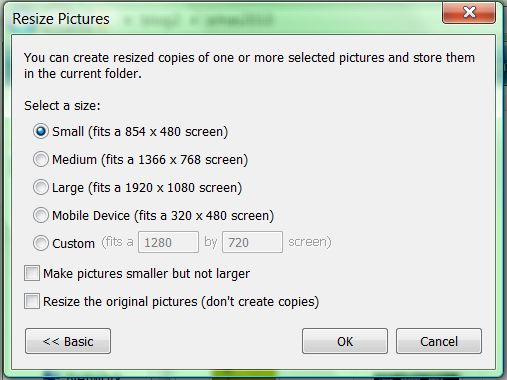
The best, fastest, and easiest small image resizing tool is the Image Resizer Powertoy originally for Windows XP. It unfortunately is no longer supported by Microsoft but a huge fan base keeps it going for newer Windows versions.

It is simple after you download and install the program it adds a line to you right-click options when right-click a picture.


The second screen pops up and gives you a several options to resize the image. It will create a second file for example: original.jpg is resized to original (small).jpg.

While there maybe hundreds of photo editing software this is the best for older computers and Windows machine in general is Image Resizer.

Currently you can get the latest community supported versions at CodePlex.

100% is what I would give this little app and I hope they keep supporting it over at CodePlex.

Sunday, January 20, 2013

Excel Choropleth Maps for Coins

Project:
Have a map of the world that shows all the countries I collected coins from and have the shaded dark if I own a lot and shaded lightly if I only own a few coins, the top ten countries with the most coins owned should be obvious at first glance.

Plan: 
Create a heat map using my existing Excel file of world coins. Search the web for the best solution.

Results:

Map with U.S. and Canada included.
Map excluding U.S. and Canada.


Row Labels Sum of Value Sum of Coins

1 Great Britain $34.41 228

2 France $34.33 160

3 Spain $28.28 145

4 Trinidad & Tobago $8.83 76

5 Italy $31.07 70

6 Jamaica $12.02 60

7 Germany $33.57 51

8 Mexico $53.87 51

9 Israel $6.98 47

10 Greece $31.08 45


Grand Total $274.44 933

To make the map I downloaded Chloropeths maps featured on the Clearly and Simple website, a great site for data visualization. These maps have Microsoft friendly shapes that are associated with data. The shapes color is set by the user and using a formula will increase or decrease in intensity with the corresponding data.

I modified the RGB value associated with the shapes color to this:
=IF(D9>499,(udf_RGB(255,255,255)),udf_RGB(230-C9,255-C9,204-C9))
The reason is this allows certain data that is small to get colored white instead of lightly shaded. Also altered the original color from black to green and changed the background to blue to look like a real map.

The map is not perfect as many countries are missing and the shading is not "extreme" enough. More contrast can be controlled but small changes alters the map wildly. I can see modifying it further to make the top ten a different color or making it change with the value of coins.

Greenland is mislabeled as part of Canada I currently do not know how disassociate Greenland from Canada without erasing all of Canada. Luckily I have no Greenland coins which makes the second map more accurate.

Conclusion:
It works well and has great potential. Learn from Clearly and Simply because the site is a wealth of information. I plan to keep tweaking the map until it is simpler to use and modify then post up somewhere. Warning the maps are both protected and macro filled so you need to deal with that first.

Wednesday, December 21, 2011

Excel vs. Access: Part 1

The Project:
List 2,031 coins by country, date, denomination, grade, value, quantity, variety, and worth.

 
Excel Access
Very customizable Limited options
Sheets for each country Tables can be made
Macros needed get sheet names Data easily manipulated
Shared easily Few people use it

Decision: 
Excel, because using Access at work I noticed some short comings when converting to Excel. Plus when sharing no one wants Access files. Plus at the beginning I did not know how to classify varieties and thought Excel gave me more choices.


Verdict:
I like the look of the Excel sheets and stuff is easy to find. Unfortunately it is difficult to make graphs and tables involving all the coins. On second thought I should have done it in Acces and just like my work files take a day or day to adjust the Excel output.

When I have time I will make an Access file version.

Tuesday, June 14, 2011

Image Resizer

Image Resizer Powertoy

This was a staple in Windows XP. Just right click any image file in your folders and you get the choice to resize. You can select multiple images and even make them bigger.

Right click an image and you have the choice to Resize Picture without opening it.

The options are simple but you can customize them as you need.

Although eliminated from all Windows versions after XP there is an unofficial version for Vista and 7.

Here's why this is a 100% program...
Pros

  1. Easy to use
  2. Advance options are simple and actually useful
Cons
  1. Is not standard on Windows
Rating: 10 out of 10 (100%)

Got it at: Image Resizer for Windows, free (Vista is my OS)

Thursday, June 2, 2011

Microsoft Mathematics 4.0

Microsoft Mathematics 4.0

Always wanted this program but even at $14.95 it was too expensive but with the 4.0 version it became free. It works great but it is limited take the simple heart function for graphs. When it is Valentine's Day and you want to quickly draw a heart virtually any graphing program would do. Except for this one.

I used this simple formula.


The results in any other graphing calculator is a pretty heart. I did confirm this in Maple, MATLAB, and GraphCalc.


The results in Microsoft Math 4.0 is absolutely nothing.

I figure you have to transform the equation first but that defeats the purpose. When graphing it is good to know how to manipulate an equation but efficiency is also important.


Here's why this is a 70% program...
Pros
  1. Step by step equation solver
  2. Nice interface
Cons
  1. Does not graph well
  2. Difficult to change equations once written
Rating: 7 out of 10 (70%)

Got it at: Microsoft Download Center

Saturday, May 28, 2011

Office 2010

Microsoft Office 2010 Enterprise

A suite of programs originally meant for businesses but now is used to improve productivity everywhere. Add to this the Office Web Apps and SkyDrive for the ultimate non-stop productivity party.

Professionally I use Access and Excel for data, Word for reports and PowerPoint for presentations.

Personally I use Excel for everything from hobbies and budgeting and fun.


Here is a quick review of the Office suite I have installed...
Microsoft Access 2010: Great for making databases.
Microsoft Excel 2010: Great for turning data into something presentable and pretty. Improvements in table functions are among the best tools. Sparklines are brilliant.
Microsoft Infopath Designer 2010:  Never used, this some type of form maker.
Microsoft Infopath Filler 2010:  Never used, this some type of form filler.

Microsoft Office Visio 2007: Not part of the suite it must be purchased separately it can create charts and diagrams with great detail and data.  

Microsoft OneNote 2010: It is like a white board where you can throw up anything online or in files. The only limit is your imagination...seriously.
Microsoft Outlook 2010: Used once then never again, it has to be the most useless part of Office. At my job we use Lotus Note and at home I use online emails so all this product does is pop-up anytime I accidentally click an email link.
Microsoft PowerPoint 2010: Great for presentation again if you have an imagination you can do some incredible things. The new cropping tool is beyond excellent.
Microsoft Publisher 2010: Great for making things that will get printed.
Microsoft Sharepoint Workspace 2010: Never used, share your work program.
Microsoft Word 2010: Great for reports and writing in general.

Microsoft Picture Manager 2010: Easiest picture editor on Windows.

Here's why this is a 100% program...
Pros
  1. Easy to use but can get complicated
  2. Virtually anything that can be printed or sorted can get done
  3. Can be customized and improved with programs or add-ons
Cons
  1. Memory hog
  2. Slows down after a while (see above)
Rating: 10 out of 10 (100%)

Got it at: On The Hub
Related Posts Plugin for WordPress, Blogger...