Showing posts with label Laptop. Show all posts

Tuesday, October 30, 2012

Realm of the Mad God

Okay technically not a download but it had to be mentioned. This is a massively multiplayer online game and is free to play. You are a fighter of  a certain class and go around killing monsters and gods for loot. The more you stuff you get the stronger your character gets and there is no end, unless you die.You play it on Steam or like me on Kongregate.

Above is the entry flash page. You can see the credits, legends of the game, play, choose servers, and review your account. If you play at Kongregate you get bonus content and can earn Kongregate points.


You start out in the Nexus where you can chat with other, trade for better stuff, or get free drops. You can check your vault or change your character. Buying stuff is an option but I do not spend money on games. The guys who now make this game are constantly updating and celebrate many holidays with special items and places. From there you can pick different rooms once they reach 85 people the realm is closed.


The game play is simple, go out and kill monsters and gods. Sometimes they drop pouches full of goodies. Keep and upgrade good things until everything you have is maxed out. The better the item the more rare and the stronger you have to be to get it.

Here's why this is a 100% program...
Pros:

  1. Super fun time.
  2. Great game play.
  3. Mostly cool community.
  4. It is challenging.
Cons:
  1. Lots of spamming.
  2. Super strong players ruin the game by running ahead without clearing.
  3. Lots of cheating.
Rating: 10 out of 10 (100%)

Play it at:
Kongregate: Mad God, free to play, some item cost money

Friday, June 22, 2012

Optimum App For Laptops

Optimum App For Laptop

It is all your cable TV channels on your laptop. The software you download is pretty simple and requires only an Optimum Account and a monitor that is not separate. Apparently the first thing the software does is look if your screen is built in. If not then it won't download.


It works pretty well but there is some buffering in HD. It is not as sharp as many other services but you can watch one show on TV while another is playing on the laptop. This brings back my ability to watch two shows at once that I lost after the analog signals went dead.

Here's why this is a 90% program...
Pros:

  1. Free for customer
  2. Works as advertise
  3. Watch two shows or change the channel on your TV.
Cons:
  1. Buffering...
Rating: 9 out of 10 (90%)

Got it at:
Optimum: Only free, if you have an account and a laptop.

Monday, November 21, 2011

McAfee Net Guard

McAfee Net Guard

For a week every time I got on the internet everything was slow. Gmail would get stuck, could not download anything, Youtube videos would not play beyond 14 seconds, and most sites needed to be constantly refreshed to work. At the beginning of last week everything updated. Windows, Adobe, and McAfee all updated on the same day.

It took a while to figure what messed up but thanks to some Youtube research it was narrowed down to firewall issues. I checked McAfee and turn several things on and off until the internet worked again. The culprit was Net Guard.


Net Guard is a feature that automatically avoids risky connections. The problem is that it labels everything as "risky". There is a way to edit the untrusted connection but they had names like http:122.1090.019 and server.theuun.ooap/aihoia/%20pabuua.thh.555. All this is gibberish to me and I have no time to go one by one and change each setting. Add to that I visit 20 to 100 sites a day, most just once, so I found this feature a major annoyance.

Solution
Turned it off.
Maybe later if I have time I will turn it on and "trust" each site I visit but that seems like a hassle for now.

Here's why this is a 10% program...
Pros

  1. Worked great until the last update.
Cons
  1. It's a beast. It will block everything and cripple all your browsers.
Rating: 1 out of 10 (10%)

Got it at:
McAfee for about $90 for the full package.

Saturday, August 20, 2011

AutoCAD 2010

AutoCAD

A 2D and 3D CAD(Computer-Aided Design) program that is one of best and definitely one of the most complicated. It can used to design everything from dresses to coins to skyscrapers.

Simple widget design.
The reason I am using 2010 is because that was the last year I was in college and could get it with the student discount for free.

Learning the program is simple enough but you should keep up since each version changes slightly. I started with AutoCAD 2002 and the changes are significant. Weather creating parts for a vehicle or adding layers to an HVAC system the need for good math skills becomes apparent.

The ribbon replaces the menu but using both is a better option.


Here's why this is a 80% program...
Pros
  1. Mouse is not necessary
  2. Huge files handles great
  3. Many options and plug-ins available
Cons
  1. Expensive
  2. Hard to navigate menus
  3. Help (F1) not really helpful
Rating: 8 out of 10 (80%)

Got it at:
College: (try your local college)
AutoCAD: AutoCAD, $4,295


Tuesday, June 28, 2011

FireFox 5.0

FireFox 5.0

Recently I reviewed Firefox 4.01 which turned out to be a crash-crazy browser. I got the new version over a week ago and it has not crashed once while doing the same task as always.

Here it is while using Google's new search format.
Hundreds of tiny improvements have worked. But the best feature is the Do Not Track function. To quote Mozilla "...transmitting a Do Not Track HTTP header every time your data is requested from the Web." is how it works. I have been noticing that my Google ads are the same no matter what site I visit hopefully that will stop.

Here's why this is a 80% program...
Pros

  1. Easy to use
  2. It has stopped crashing
Cons
  1. Is hogging more memory
Rating: 8 out of 10 (80%)

Got it at: FireFox 5.0

Tuesday, June 14, 2011

Image Resizer

Image Resizer Powertoy

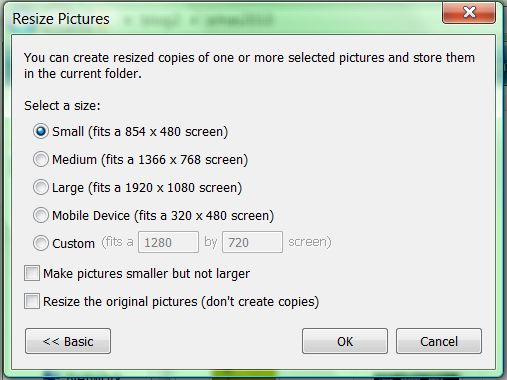
This was a staple in Windows XP. Just right click any image file in your folders and you get the choice to resize. You can select multiple images and even make them bigger.

Right click an image and you have the choice to Resize Picture without opening it.

The options are simple but you can customize them as you need.

Although eliminated from all Windows versions after XP there is an unofficial version for Vista and 7.

Here's why this is a 100% program...
Pros

  1. Easy to use
  2. Advance options are simple and actually useful
Cons
  1. Is not standard on Windows
Rating: 10 out of 10 (100%)

Got it at: Image Resizer for Windows, free (Vista is my OS)

Thursday, June 9, 2011

Dropbox

Dropbox

A file sharing and online storage site. I prefer yousendit but that one is more costly, granted when working it is worth it. This has a feature to download a program to your computer this way you can drag and drop any file without having to power up your browser.

There is also a mobile version but I have yet to try it.

Storage is at 2GB but with tricks and codes and a little work you can expand it. If you want to pay it  goes upto 100GB.

Simply interface and the ability to share files of any type with categories are the best features.

It quietly sits on the toolbar when activated but it can also be turned off with a quick click.


Here's why this is a 70% program...
Pros

  1. Easy to use
  2. Ability to share and un-share whatever you want
Cons
  1. Not as many file sharing choices as other cloud storage programs
  2. If you have Gmail then Dropbox seems redundant
Rating: 7 out of 10 (70%)

Got it at: Through a friend's recommendation at Dropbox, free for 2GB

Monday, June 6, 2011

Adobe Reader X

Adobe Reader X

The original PDF reader available for free. This is the tenth version and one of the worst. At work there is a mix of version 6 and 7 on various computers and that reminds me how great these Adobe Readers use to be. Even version 9 had better controls.

My biggest complaint is the lack of simple control for views. Most of the files I work with has to be at 150% and when switching the pages in Reader X it always goes back to 33% or page fit. This never happened in the other versions. I can not find how to solve the problem since I spend more time in version 6 or 7.

Anyone knows how to fix the size for every page just leave a comment?


Here's why this is a 50% program...
Pros
  1. Can handle most PDF files
Cons
  1. Bad controls 
  2. Hard to customize
  3. Web portion has no preview, partial download are unreadable
Rating: 5 out of 10 (50%)

Got it at: Official Adobe Reader download (Free)

Thursday, June 2, 2011

Microsoft Mathematics 4.0

Microsoft Mathematics 4.0

Always wanted this program but even at $14.95 it was too expensive but with the 4.0 version it became free. It works great but it is limited take the simple heart function for graphs. When it is Valentine's Day and you want to quickly draw a heart virtually any graphing program would do. Except for this one.

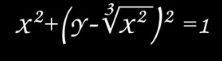
I used this simple formula.


The results in any other graphing calculator is a pretty heart. I did confirm this in Maple, MATLAB, and GraphCalc.


The results in Microsoft Math 4.0 is absolutely nothing.

I figure you have to transform the equation first but that defeats the purpose. When graphing it is good to know how to manipulate an equation but efficiency is also important.


Here's why this is a 70% program...
Pros
  1. Step by step equation solver
  2. Nice interface
Cons
  1. Does not graph well
  2. Difficult to change equations once written
Rating: 7 out of 10 (70%)

Got it at: Microsoft Download Center

Tuesday, May 31, 2011

Zoner Photo Studio 13 Home

 Zoner Photo Studio 13 Home

This is a medium level photo organizer and processor. It is more powerful than my basic Microsoft Picture Manager 2010 but still not a heavyweight like Gimp.

While it can organize your picture the best part is the editor. Quick and precise crops and a variety of effects can be done with out hogging up that precious memory.


Here are the full highlights from the Zoner.com site...

  • Catalog, advanced picture management and archival NEW!
  • 64-bit program version NEW!
  • direct upload to Facebook, Flickr and Picassa Web Albums NEW!
  • acquire photos from your camera, scanner, card, or screen
  • fix pictures fast with Quick Fix
  • save time with convenient batch operations
  • create panoramas and 3D photos easily
  • use a wide array of edits and effects
  • add GPS photo locations and see them on a map
  • publish to the web easily and directly
  • templates for calendars, greeting cards, and more
While I have not used all the options I am glad that they are available. The Pro Edition is said to be twice as awesome.

Here's why this is a 80% program...
Pros

  1. Easy to use
  2. Each photo has its own tab all set in the program window (unlike Gimp)
Cons
  1. Buttons are often confusing
  2. Can't open the program directly, need to right click the picture (maybe my fault but I can't find a fix)
Rating: 8 out of 10 (80%)

Got it at: Giveaway of the Day (back in January, it will probably come up again soon if not $44.99)

Thursday, May 26, 2011

FireFox

FireFox 4.01

This is an internet browser that is customizable in a variety of ways. Sure you change look, layout, and functions but can you stop it from hogging up all your memory? Nope.

Mozilla Firefox is one of the most prominent companies to use the model of "first to market then fix the bugs". Their constant updates making the product seem fresh and new. Young people especially prefer a product that is updated periodically instead of one that is finished and perfected.

I keep Internet Explorer 9 as my default since it is much more stable although slower, plus a few sites are still not Firefox friendly. I also tried Opera for a few years and while a superior browser it lacks some add-on features.


Crashing is a common in Firefox and despite clean installs thanks to Java heavy sites I like to visit I still have problems. Most recently with the new Yahoo Mail.

Here is my current extension list...
Exif Viewer 1.60: It shows all of a pictures properties if available, for us amateur photographers it is good.
IE View 1.4.5.1: To quickly use Internet Explorer when you need a second browser.
Image Zoom 0.46: To zoom or flip images online.
Java Console 6.0.25: Needed for Java stuff.
McAfee SiteAdvisor 3.3.1: Great for blocking bad sites.
TinEye Reverse Image Search 1.1: Again for my photography it is great to see who has your picture or find the original of someone else's pictures.

I will add extensions as needed but for now I am trying to keep FireFox lean.

Here's why this is a 70% program...
Pros

  1. Easy to use
  2. Very customizable
Cons
  1. Often crashes
  2. Constant updates
  3. Although lots of extensions exist it still not 100% customizable
Rating:  7 out of 10 (70%)
Got it at :  Mozilla.com
Related Posts Plugin for WordPress, Blogger...