Friday, July 8, 2011

Kindle

Kindle for PC
Kindle for Android with Whispersync

That famous e-book reader without having to spend one cent on the hardware. Well assuming you already own a smartphone or computer.

For PC version is not as easy to read but is very fast.

For Android version much easier to read, also has a better format.

The PC version tries to imitate a Mac experience which I never liked. The list in Android makes every seem organized. On Android there is a Whispersync feature that syncs all versions of your Kindle this way you never have to scroll through the pages.

Here's why this is a 70% program...
Pros
  1. Android version is better
  2. Books make you smarter 
  3. Thanks for the Sepia option
Cons
  1. PC version make my eyes twitch
  2. Still they are books
Rating: 7 out of 10 (70%)

Got it at:
Amazon:  Kindle for PC, free
Android Market: Kindle for Android with Whispersync, free

Tuesday, June 28, 2011

FireFox 5.0

FireFox 5.0

Recently I reviewed Firefox 4.01 which turned out to be a crash-crazy browser. I got the new version over a week ago and it has not crashed once while doing the same task as always.

Here it is while using Google's new search format.
Hundreds of tiny improvements have worked. But the best feature is the Do Not Track function. To quote Mozilla "...transmitting a Do Not Track HTTP header every time your data is requested from the Web." is how it works. I have been noticing that my Google ads are the same no matter what site I visit hopefully that will stop.

Here's why this is a 80% program...
Pros

  1. Easy to use
  2. It has stopped crashing
Cons
  1. Is hogging more memory
Rating: 8 out of 10 (80%)

Got it at: FireFox 5.0

Tuesday, June 21, 2011

Peggle

Peggle

This was one of my favorite games on PopCap but due to its limited play online I stopped playing it a year ago. Now it is on Android phones making it something else to distract me and zap my battery life.


Quick to open
Typical instructions.
With the lack of a mouse you use a touch screen scroll wheel instead. Since the game is limited to left and right movements it does work well.

And then let the pinball type fun begin.
Here's why this is a 90% program...
Pros

  1. Easy to play
  2. Great graphics and game play
Cons
  1. Wi-Fi only download
  2. Waste of time and energy although fun
Rating: 9 out of 10 (90%)

Got it at: Peggle on Amazon Free today, Usually $2.99

Tuesday, June 14, 2011

Image Resizer

Image Resizer Powertoy

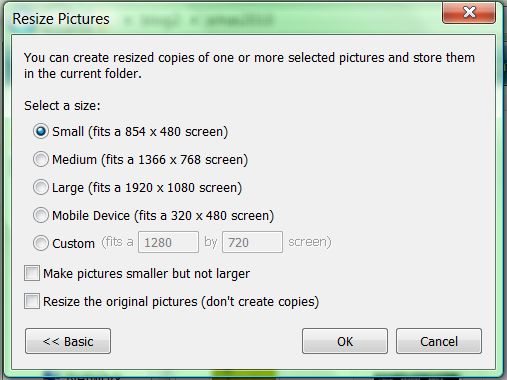
This was a staple in Windows XP. Just right click any image file in your folders and you get the choice to resize. You can select multiple images and even make them bigger.

Right click an image and you have the choice to Resize Picture without opening it.

The options are simple but you can customize them as you need.

Although eliminated from all Windows versions after XP there is an unofficial version for Vista and 7.

Here's why this is a 100% program...
Pros

  1. Easy to use
  2. Advance options are simple and actually useful
Cons
  1. Is not standard on Windows
Rating: 10 out of 10 (100%)

Got it at: Image Resizer for Windows, free (Vista is my OS)

Friday, June 10, 2011

Angry Birds: Trilogy

Angry Birds Rio
Angry Birds
Angry Birds Seasons

The ultimate game for phones. There is little to add that can not be found on a thousand different sites. I will say this is my go to game when I am very bored. Unfortunately my memory card failed once and it wiped out my scores until I found a back up. The small interruption was enough to make me slow down playing most games.


Here's why this is a 90% program...
Pros
  1. Easy to learn
  2. Great graphics and game play
Cons
  1. Some levels are a it hard and getting three stars is tough
  2. Gets redundant
Rating: 9 out of 10 (90%)

Got it at: Android Market,Amazon App Store (All free at the time)

Thursday, June 9, 2011

Dropbox

Dropbox

A file sharing and online storage site. I prefer yousendit but that one is more costly, granted when working it is worth it. This has a feature to download a program to your computer this way you can drag and drop any file without having to power up your browser.

There is also a mobile version but I have yet to try it.

Storage is at 2GB but with tricks and codes and a little work you can expand it. If you want to pay it  goes upto 100GB.

Simply interface and the ability to share files of any type with categories are the best features.

It quietly sits on the toolbar when activated but it can also be turned off with a quick click.


Here's why this is a 70% program...
Pros

  1. Easy to use
  2. Ability to share and un-share whatever you want
Cons
  1. Not as many file sharing choices as other cloud storage programs
  2. If you have Gmail then Dropbox seems redundant
Rating: 7 out of 10 (70%)

Got it at: Through a friend's recommendation at Dropbox, free for 2GB

Wednesday, June 8, 2011

Advanced Task Killer

Advanced Task Killer 1.9.6B76

An app to kill all other apps. And yes it can kill itself.

There is some controversy over this app. Apparently most phones Android 2.2 or higher are so great with managing applications this kind of app is not necessary. That said it is still good to have in case you want to end some apps immediately.


Here's why this is a 80% program...
Pros
  1. Can stop most apps
  2. It is customizable
Cons
  1. Mostly useless, still nice to have
Rating: 8 out of 10 (80%)

Got it at: Market Android, free
Related Posts Plugin for WordPress, Blogger...